Speed to lead: how fast to respond to leads
What speed to lead is, what Harvard Business Review found, and how a small team can measure and cut its lead response time.
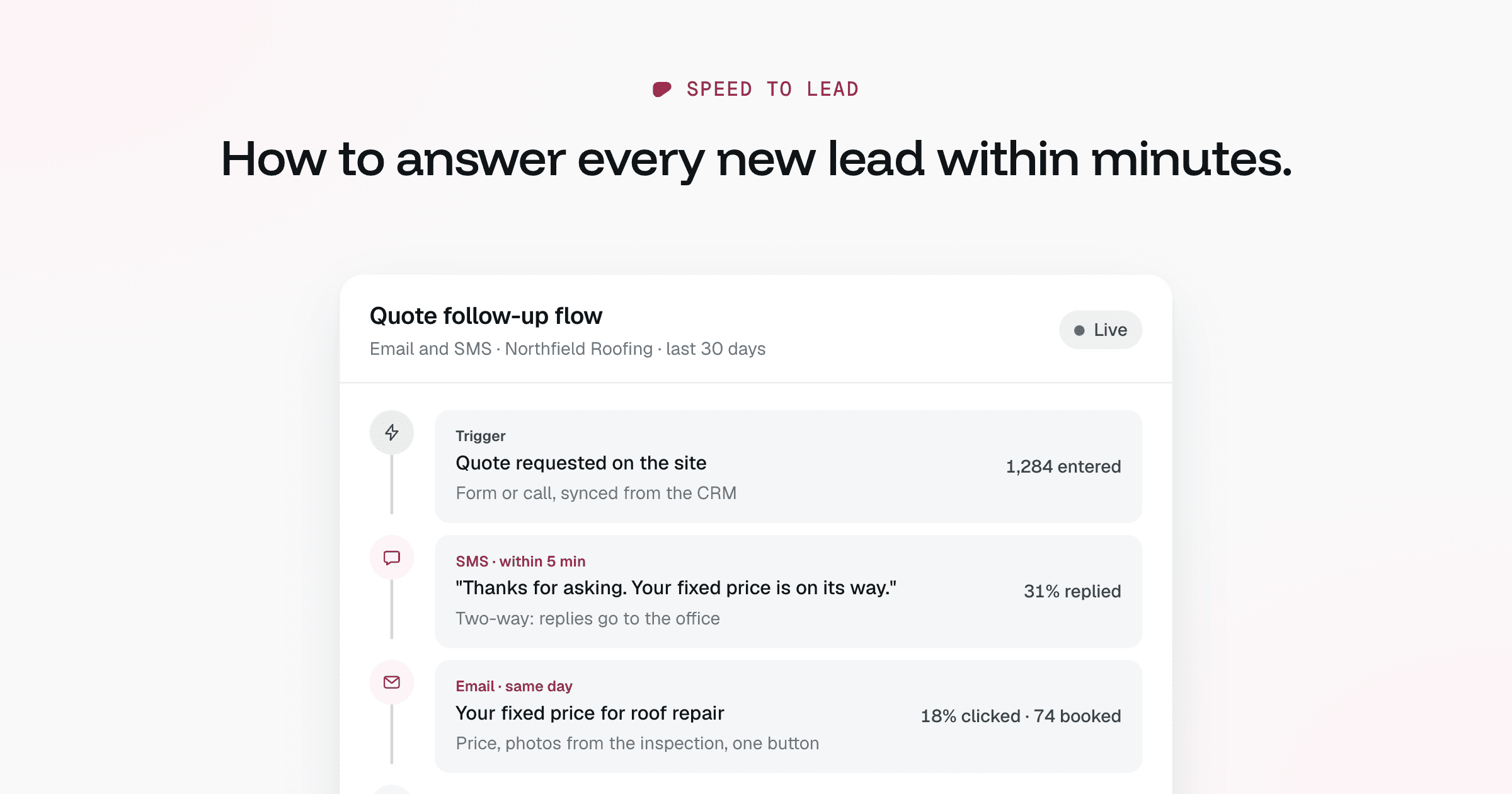
Speed to lead is how fast your business responds to a new lead. You measure it as lead response time: the gap between the moment a form, ad lead or call comes in and the first real call or text from someone on your team. The shorter that gap, the better your chance of reaching the person while they still want help. People who need a quote often ask more than one company, so the first business to call gets the first real conversation.
This guide is for owners and office managers whose leads come from ads, web forms and calls. It shows you how to measure your lead response time and how a small team can bring it down.
What speed to lead means
Speed to lead and lead response time are two names for the same number. The clock starts when any inbound lead reaches you, whether that's a web form, a Google or Meta lead form, a call you missed or a chat message. It stops at your initial contact: a call or a personal text from someone who can help.
An automatic "we got your request" email or text is worth sending. It doesn't stop the clock, though, because the lead still hasn't talked to a human.
What Harvard Business Review found about lead response time
In March 2011, Harvard Business Review published "The Short Life of Online Sales Leads" by James B. Oldroyd, Kristina McElheran and David Elkington. It reports on two pieces of research.
First, the authors audited 2,241 US companies, timing how long each took to respond to a test lead sent through the web. According to the article:
- 37% responded within an hour.
- 23% never responded at all.
- Among companies that responded within 30 days, the average response time was 42 hours, almost two full days.
Second, they analyzed 1.25 million sales leads received by 42 US companies. In that data:
- Companies that tried to contact a lead within an hour were nearly 7 times as likely to qualify it as companies that waited even an hour longer.
- They were more than 60 times as likely to qualify it as companies that waited 24 hours or more.
The authors defined qualifying a lead as having a meaningful conversation with a key decision maker.
What the first hour tells you
The research is from 2011 and looked at web leads, so it can't tell you the exact minute that matters for your business today. It does show a big gap between companies that reached out in the first hour and those that took a day or more.
If your own average lead response time is measured in hours, get it under one hour first. Then keep working it down.
Why lead response time matters for a service business
When a homeowner needs a plumber or a roofer, they often run a Google search, tap an ad or two, and fill in a form or call a few companies in a row. Then they wait to see who gets back to them.
The first company to call gets to ask questions and book the visit. By the time the third company calls, the homeowner may already have someone coming. Your price and your reviews don't get a fair look if the job is gone before you call.
Your response time also tells potential customers something about how you run your business. A quick, friendly call shows someone is paying attention. A call back two days later suggests the opposite, before the job has even started.
What slow follow-up costs on paid leads
If your leads come from Google Ads or Meta ads, you paid for each one whether you call it back or not. Say your cost per lead is $60 (an example). Ten leads that never get a call cost you $600 and can't turn into jobs, so the jobs you do book end up carrying that cost. You can work out your own figure with our cost per lead calculator and compare it with what a good cost per lead looks like.
How to measure your average lead response time
To start, you need two times for every lead: when it came in and when someone first reached out. Your phone system and your CRM or form tool usually record both. Once you have them, you can see where the gaps are, like nights, weekends or one lead source that keeps waiting.
Pull the timestamps
- Export last month's inbound leads with the date and time each one came in. Your CRM, form tool or the ad platform's lead export will have this.
- Export outbound calls and texts for the same month from your phone system.
- For each lead, find the first real call or personal text back and note its time.
Missed calls are leads too. Your phone system's call log shows when each one rang.
Do the math
Response time = time of first real contact minus time the lead came in
Average response time = total of all response times divided by number of leads
The average can mislead you. A single weekend lead that waits 60 hours can pull a whole month's average up. So we also count how many leads got a call within set times:
- within five minutes
- within one hour
- the same business day
For example, say 40 leads came in last month. 10 got a call within five minutes, 24 within one hour and 34 the same business day. That's 25%, 60% and 85%. Start with the 6 leads that waited until the next day or later and find out why.
Check nights and weekends separately
Split the leads that came in during business hours from the ones that came in at night or on weekends. They're different problems. A slow lead response time during the workday means the process inside the office needs work. A slow one at night means you need a better after-hours plan.
How to improve lead response time with a small team
A small office can run all of this. Most of it is setup you do once, plus one clear rule about who calls.
Send an instant confirmation
When a form comes in, send an automatic text message and email right away. Confirm you got the request and set expectations by saying when someone will call: "Thanks for reaching out to [Company]. We got your request and will call you within 15 minutes." Only promise a time you can keep.
Call fast during business hours
During the workday, treat a new web lead like a ringing phone. Pick a target your team can hit, such as five minutes, and an outer limit, such as one hour. Track how often you hit each one.
Set a time after hours
At night and on weekends, send an after-hours message with a real time in it: "We'll call you tomorrow between 8 and 9 a.m." Then put those leads at the top of the morning list. A set time tells the person when to watch for your call.
Text back missed calls
When a call goes unanswered, have your phone system send a text right away: "Sorry we missed you. This is [Company]. Reply here or tell us a good time to call back." Many phone systems and CRMs can do this for you.
Send lead notifications to a phone
Leads wait in shared inboxes because everyone assumes someone else has them. Send lead notifications as a text or app alert to the phone of whoever is on lead duty. Keep email as a backup copy.
Make one person responsible each shift
Name one first responder per shift. That person calls new leads first, and they can still answer the front desk or do other work. Without a name on it, a lead can get lost while each person assumes someone else called.
Follow up for several days
Plenty of people won't pick up the first time. They're at work, driving or on another call. A simple follow-up plan keeps good leads from going cold:
- Day 1: Call right away. If there's no answer, leave a short voicemail and send a text.
- Day 1, later: Try again a few hours later.
- Days 2 and 3: One call and one text or email each day.
- Days 5 to 7: One last friendly message, such as "Just checking if you still need help with your [service]. Reply here and we'll set up a time."
Log every attempt in your CRM or a spreadsheet. At the end of each day, check that no lead has zero attempts.
Texting rules for lead follow-up
Texting is often the quickest way for people to reply, especially at work. Before you text leads, set up these three things:
- Get consent on the form. Add a clear checkbox with plain words like "Yes, you can text me about this request."
- Register your business texting. US carriers require businesses to register before they text customers from a regular local number. This is called 10DLC registration, and your texting provider handles it by registering your business with The Campaign Registry. Texts from unregistered numbers get blocked, as Twilio's error page for unregistered 10DLC numbers shows.
- Honor STOP and any other clear request to opt out. The FCC says people can opt out of texts in any reasonable way. When someone replies STOP or asks in their own words not to be texted, stop texting them and make sure your system records it.
To read more, start with the FCC's consumer guide to unwanted robocalls and texts and CTIA's Messaging Principles and Best Practices, the wireless industry's voluntary best practices for messaging. This is general information, not legal advice. Rules change, so check your setup with your texting provider and a lawyer.
What to say on the first call
A fast call only helps if it goes well. Keep it short and about them.
- Say who you are and what they asked for: "Hi, this is [your name] from [Company]. I'm calling about the request you sent for [service]."
- Ask a few questions to understand the job. What's going on? When did it start? When do you need someone out?
- Offer a clear next step: "I can have someone there tomorrow between 8 and 10. Does that work?"
If they say they've called other companies, that's normal. Don't knock anyone. Tell them when you can be there and what happens next.
If your first contact is a text, keep it shorter. Say who you are and what they asked about, then offer a time to call or a link to book.
Speed to lead for Google Ads and Meta ads leads
Lead forms in Google Ads and Meta collect leads inside the ad platform, away from your website. Make sure those leads reach your team as fast as the rest:
- Connect your Google Ads and Meta lead forms to your CRM or lead alerts, so nobody has to log in to an ad account to find them.
- Send lead notifications for ad leads to whoever is on lead duty.
- Tag each lead with where it came from. Then you can compare lead response time and close rate (the share of leads that become booked jobs) by source.
Once you know which leads turned into jobs, you can send that back to Google Ads so it bids toward leads that book. Our guide to Google Ads conversion tracking shows how.
Speed to lead FAQ
What is a good lead response time?
During business hours, aim to call within five minutes. Treat one hour as the outer limit. That's the line the Harvard Business Review research measured against. After hours, reply automatically right away and call at the time you promised.
What is the 5 minute rule for leads?
It's a rule of thumb: try to reach every new lead within five minutes of it coming in. The HBR research on this page measured hours, not minutes, so five minutes is a target you set for your team. It's a good one if you have someone free to make the calls.
Does speed to lead really matter?
Yes. In the lead data the HBR authors analyzed, companies that tried to contact a lead within an hour were nearly 7 times as likely to qualify it as companies that waited even an hour longer. For a service business, it also decides who gets the first conversation when a homeowner asks several companies for a quote.
How do you calculate speed to lead?
Take the time of your first real call or text and subtract the time the lead came in. Do that for every lead. Then look at the average and at the share of leads you reached within five minutes and within one hour.
How do you calculate lead conversion rate?
Divide the jobs you booked by the leads you got, then multiply by 100. We call this your close rate. For example, 10 booked jobs from 50 leads is a 20% close rate. Work it out separately for leads you reached within five minutes, within an hour and later. Comparing those close rates shows you what speed is worth in your own business.
Does an automatic text or email count as first contact?
No. Send one anyway, because it tells the person you got the request and when you'll call. The clock stops when someone on your team actually calls or texts them.
What if I run a one-person business?
Set up the instant confirmation and the missed-call text back, so every lead hears from you right away. Then set aside time between jobs for responding to leads. Even an hour is far faster than the 42-hour average in the HBR audit, and that average only counted companies that responded within 30 days. Another 23% never responded at all.
Do I need a CRM to track this?
No. A call log and a spreadsheet are enough to start. A CRM makes it easier because it records when each lead came in and every call or text after that.
BetterSEM runs Google Ads and Meta ads for home service businesses and online stores.
Keep reading.

Book a free 20-minute call.
We'll go through your accounts with you on a shared screen.
- Where your money is going
- Whether your tracking counts the right things
- The three things we'd fix first, and what each one is worth
Calls are over video.